
Free, Google One, or Workspace: Which Gemini Privacy Are You Actually Using?
The three Gemini privacy contracts everyone has a choice between, and the one most are on by default

It’s late, you’re tired, and your kid is going through something. Sleep regression, a tough friendship at school, big feelings nobody quite has a handle on yet.
You open Gemini and start typing a long prompt. You’re trying to be helpful and are tired, so you accidentally include details, such as your kid’s name, age, grade, school name, name of a friend or a screenshot of a test that includes information like student number. You hit enter, you get a useful answer, so you feel a little better. It never crosses your mind that you accidentally just uploaded lot of personal information about your child to an LLM.
That prompt is not handled the same way on every type of Google account. The privacy contract for what Gemini does with your prompt depends entirely on which account you use, and there are three different accounts to choose from. Most of us are on the first one without knowing there are two other options.
By the end of this post, you will learn:
The three Gemini privacy tiers, and which one you’re probably on right now
What Google can actually do with your prompts on each tier (training, human review, retention defaults)
The 3-year retention catch most people have never heard of with Gemini
The Google One assumption that costs extra without getting any additional privacy
A three-path framework to help you pick the Gemini privacy policy that works for you
The Privacy Question Most Never Asked
When you use Gemini, where does that prompt actually go? Who can see it? How long does it stick around?
Most of us have never asked those questions, and even fewer of us have an answers. We’ve been treating LLMs as if there are one set of rules, when really LLMs are a piece of software running on top of an account, and the rules change depending on which account you use.
A few months ago I wrote a deep dive comparing the privacy policies of the three big AI tools, ChatGPT, Gemini, and Claude. If you missed it, head over to What Data ChatGPT, Gemini & Claude Actually Collect on You. That post is the foundation of this one and this post is the next layer deep.
The Story That Got Me Here
Last year my father was struggling with cancer and end-of-life, then shortly after passed away. I didn’t know anything about cancer or end-of-life and I didn’t understand most the medical terms.
Like any child would do, I was asking AI questions so I could understand his symptoms, what was going on, and how soon he might pass away.
At one point, after one or two conversations with Gemini, it hit me. Google was most likely training on me talking about my father having cancer, on how he was passing away, and on my emotions in the middle of all of it.
The thing that went through my head, and it might sound funny to some people, was “Could this one day affect how an AI tool treats me health-wise?” I’m not looking to hide my family’s health history from medical professionals, but what if another tool in the future uses AI and automatically uses this information without me knowing. Could the emotional information I was telling it be used in the future by an AI tool evaluating me? I don’t know if that could actually happen. But it crossed my mind and I couldn’t un-cross it.
That was when I realized it was time for a paid account. It was time to protect the privacy of my data and my family’s data.
The Thing Most Miss: A Three-Year Catch
Before I get to the three account types, here is the single fact that re-shaped how I think about Gemini.
When you delete your Gemini activity on a free or Google One account, you are not deleting all of it. Any chat that has been read by a human reviewer is retained for up to 3 years, regardless of what you do.
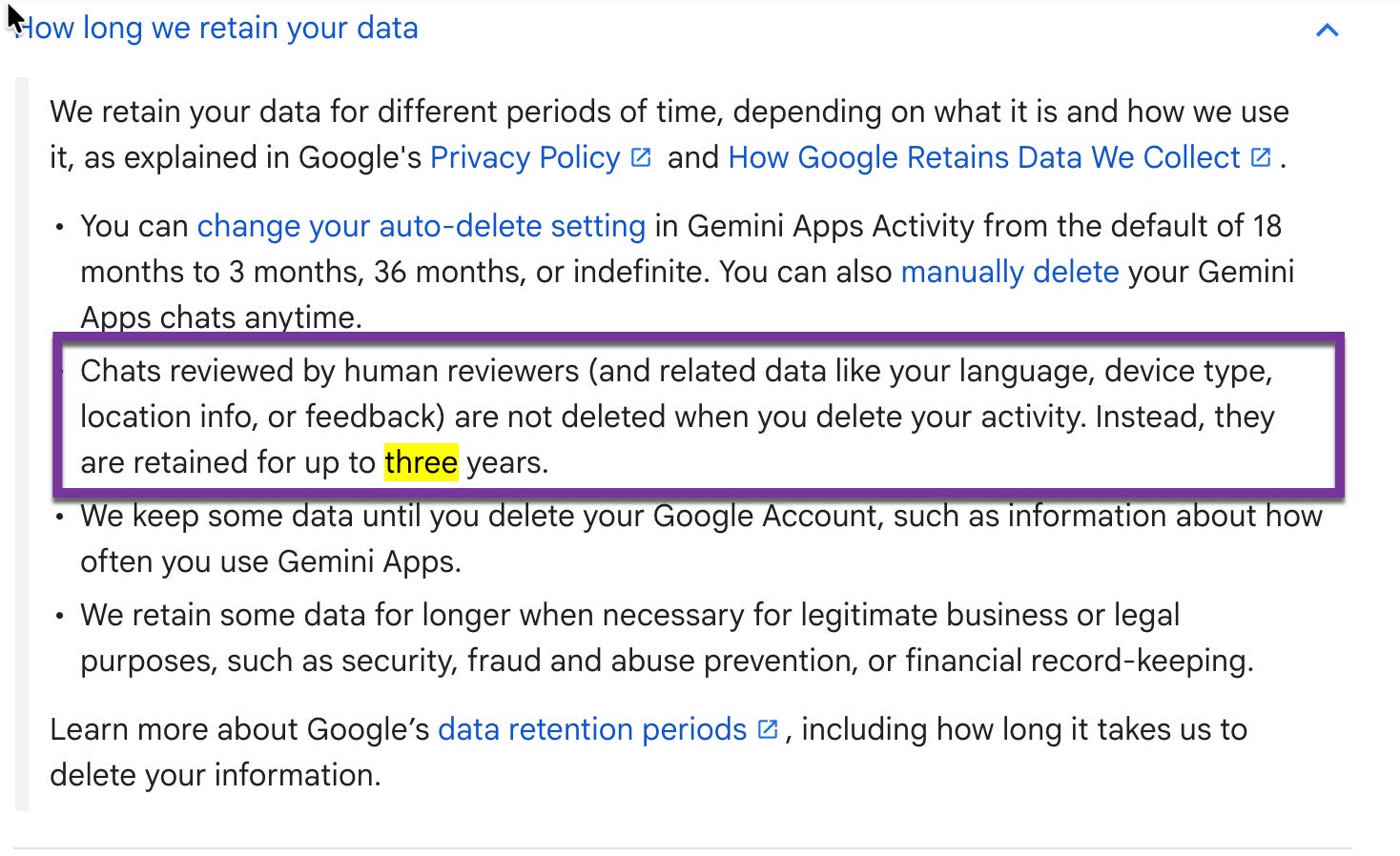
Most of us assume that “delete activity” actually deletes our activity. But if a chat has been pulled aside and read by a Google reviewer to improve the mode or service, that chat is retained for up to three years even after you’ve hit delete. You don’t get to take it back, and you won’t be told which conversations were the ones the reviewers read.
That changes how I think about every prompt I’ve already typed, and every prompt I might type in the future. It’s the kind of detail you only learn if you read the privacy policy carefully, and almost nobody does, which is why I’m putting it here at the top.
The Three Gemini Privacy Tiers
With that fact in mind, here are the three Google account tiers an adult can sign up for, and what each one actually does with your Gemini data.
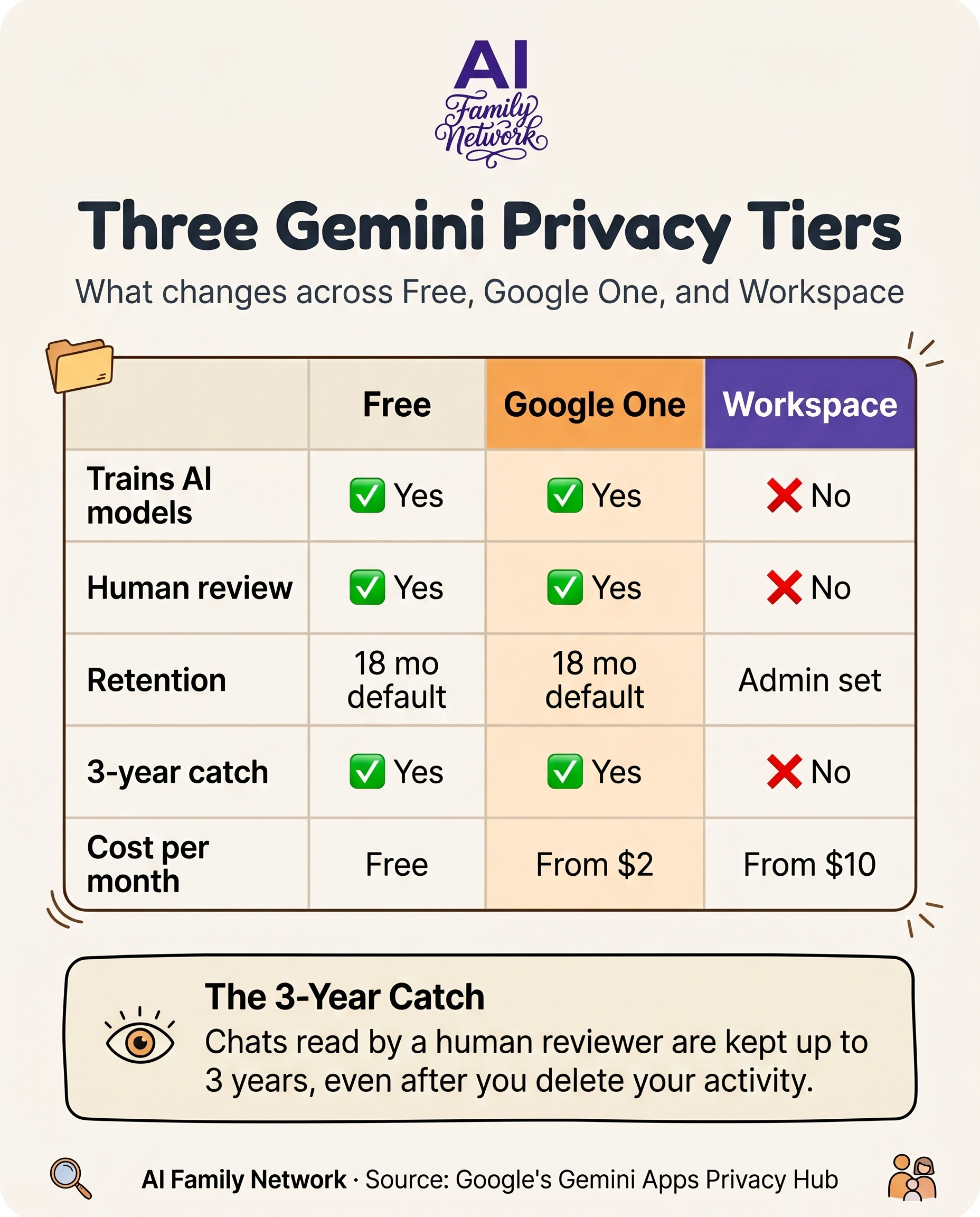
Free Google Account
What it is: the standard, no-cost Gmail account most adults already use. It powers the consumer Gemini web and mobile apps, and it costs nothing.
What Google does with your prompts: if your “Keep Activity” setting is on, your chats, uploads, and interactions can be used to train Google’s generative AI models. A subset of chats are read by trained human reviewers to improve the service, which is why Google explicitly warns you not to enter confidential information. Activity auto-deletes after 18 months by default, that said, chats that have been read by a human reviewer are retained for up to 3 years even if you delete the chat. It is worth knowing, messages you create and send through Connected Apps in Gemini, things like YouTube or Google Flights integrations, are not end-to-end encrypted by Google.
Key takeaway: this is the right pick if you’re using Gemini lightly, for low-stakes things, nothing personal or private.
Google One Account
What it is: a paid consumer subscription marketed as extra storage and premium AI features. Tiers start at around $2 a month and go up from there.
What Google does with your prompts: It is no different from the free account from a privacy perspective. You get the same training policy, human review and retention defaults, along with the same 3-year human-review catch. The only material difference between Google One and a free account, from a privacy standpoint, is that Google now also collects your subscription data too.
If you’re shaking your head, I was too. Here is how to verify it for yourself.
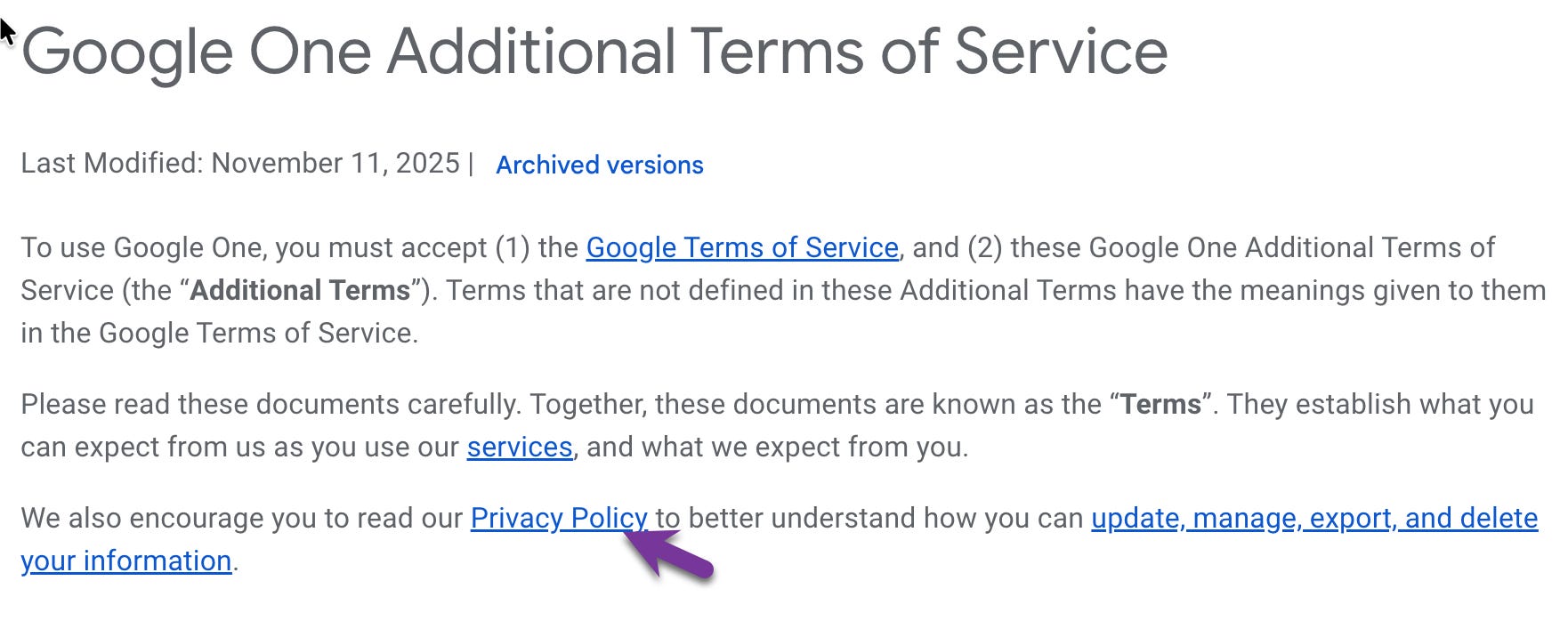
Go to Google One’s Terms of Service page, then at top click on privacy policy, which will take you to another page. Scroll down on that page to “Related Privacy Practices” and click “Gemini.” You land on the exact same privacy policy as the free account. That click was the moment this whole story clicked for me. (Source: https://policies.google.com/privacy#products)
There is one more catch worth flagging on Google One, and it’s not about Gemini specifically. If you turn on Family Sharing, other family members can see your name, your email, devices you back up, AI credits you consume, and your total storage space used. That is a different kind of privacy concern, but it’s worth knowing before you flip that switch.
Key takeaway: pick this if you want more storage and know that you are paying for storage, not privacy. Don’t go in expecting a different data contract for Gemini, because there isn’t one.
Google Workspace Account
What it is: a business, education, or enterprise account that any adult can sign up for. You don’t need a business, you don’t need a team, and you can sign up as a household of one. The first paid individual tier runs around $10 a month with an annual commitment, and pricing varies a bit by region.
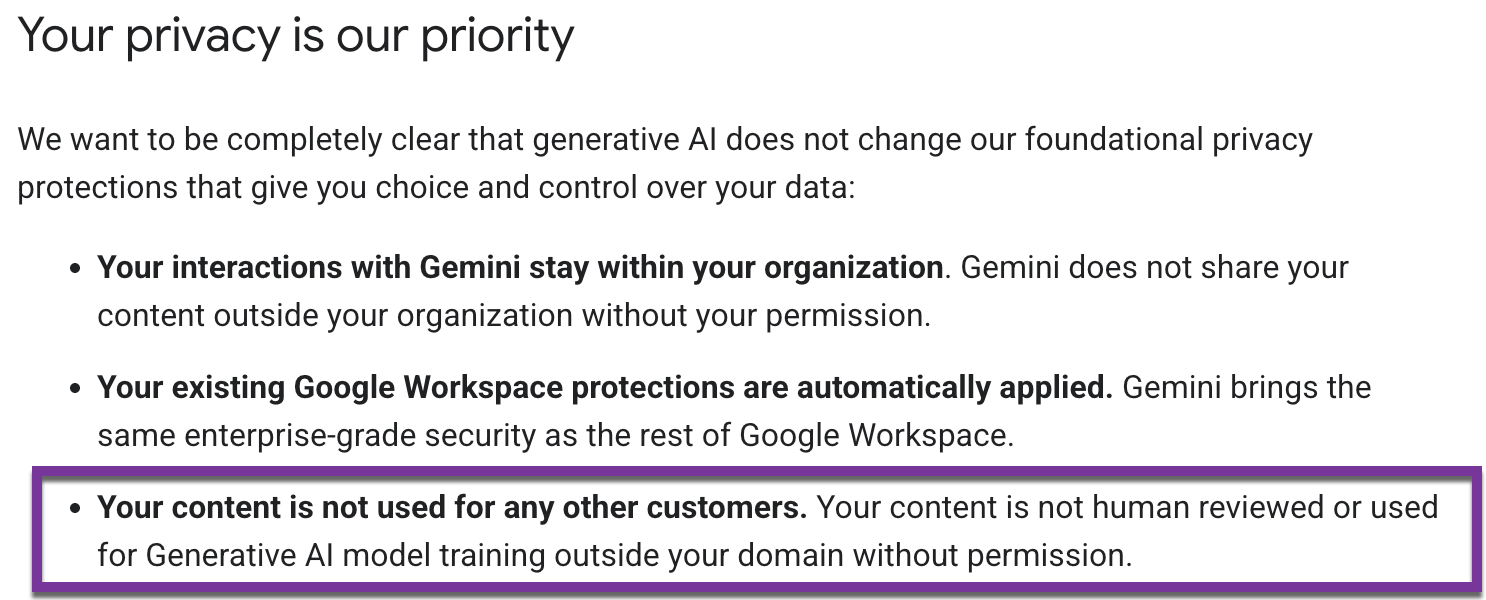
What Google does with your prompts: this is where the contract changes. On Workspace, your prompts, your Workspace content, and the responses Gemini generates are never used to train Google’s generative AI models without your explicit prior permission. There is no human review. Interactions stay strictly within your organization’s “trust boundary” (Google’s term, not mine), and Workspace queries do not have direct access to the public internet, which means your prompts don’t leak to the public web. Retention is controlled entirely by your organization’s admin, with defaults that ranging from 18 months to indefinitely.
What you also get is a layer of enterprise security most parents don’t think they need: Data Loss Prevention, Information Rights Management, client-side encryption, audit logs, and compliance support for SOC, HIPAA, FedRAMP, and ISO. You probably don’t need any of that for your family, but it comes bundled with the privacy tier, and it’s a useful signal of how seriously the contract is structured.
There is a setup tax. It’s a real time investment, and I’ll get into the specifics in a minute.
Key takeaway: pick this if you want the contractual privacy delta (no training, no human review, no leak to the public web) and you can absorb both the dollar cost and the setup tax. This is what I picked for me and my family.
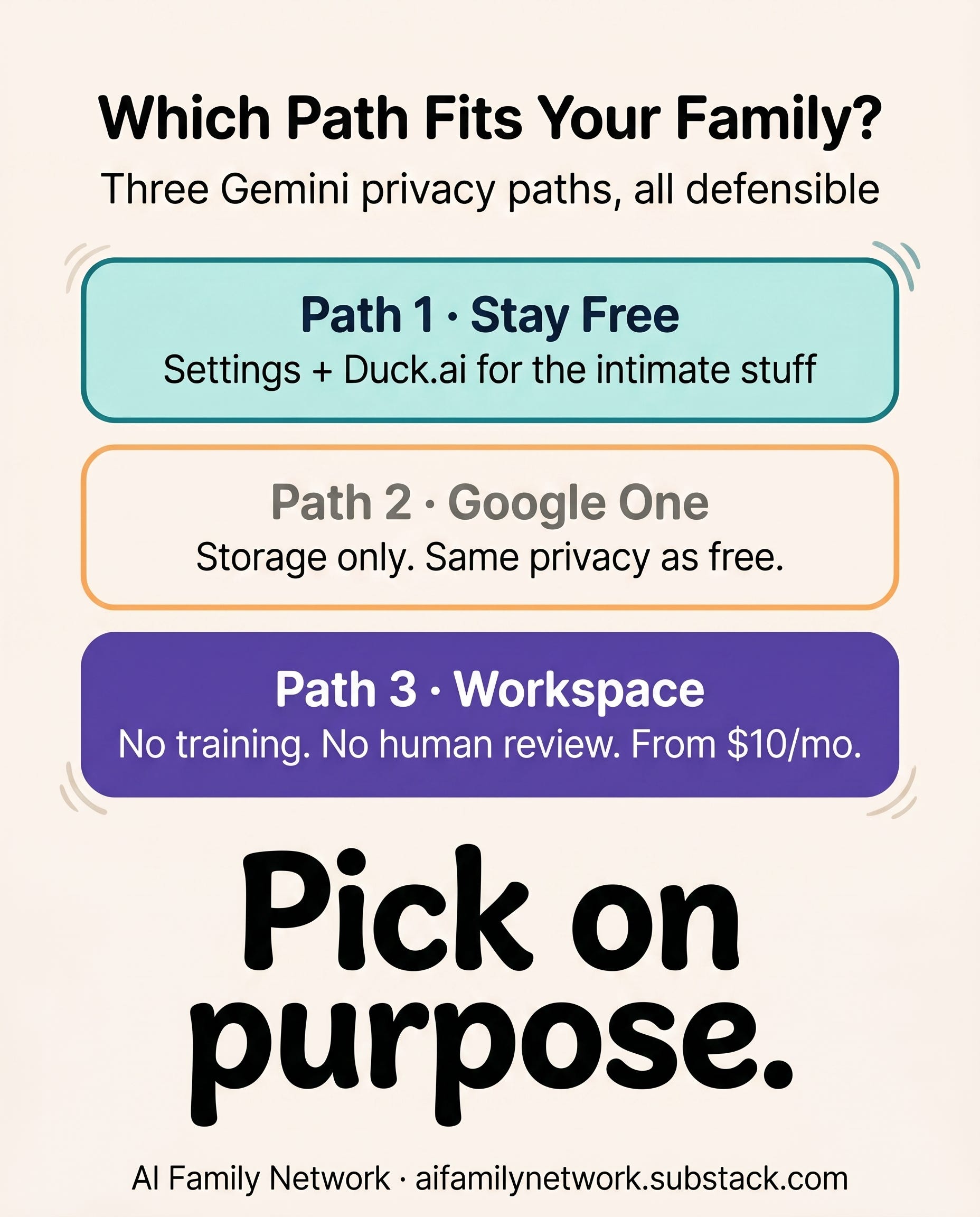
Which Path Fits Your Family?
Once I worked through the three tiers, I ended up with a small framework to help you decide which account works for you.
Path 1: Stay free, with settings and a sandbox.
If you’re staying on a free Google account, the decision is to be intentional about using it. Start by understanding Google’s privacy policy for Gemini by reading my earlier post What Data ChatGPT, Gemini & Claude Actually Collect on You. Consider turning off Gemini Apps Activity if you are able too. Then for the more intimate prompts, like mental health questions or parenting anxiety, the things you’d never want sitting in a Google data center, use Duck.ai. I wrote about why and how in A Privacy-First Way to Explore AI With Your Kids.
Path 2: Google One, but only for storage.
If you want more storage and you’re at peace with Google’s standard privacy posture, Google One is fine. Just be clear with yourself about what you’re paying for. You are paying for storage, not for privacy. Don’t go in expecting a different data contract for Gemini, because that isn’t part of the deal.
Path 3: Google Workspace, eyes open.
If you want the contractual privacy delta (no training on your prompts, no human review, no leak to the public web) and you can absorb the cost, Workspace is the answer. This is what I picked for my family, after sitting with the question for weeks. It may not be the right pick for you, and that’s fine.
The Cost of Privacy: Two Numbers, Not One
If you’re considering Path 3, there are two costs to consider before to make the jump. The first is the stand dollars cost. Workspace runs around $10 a month with an annual commitment for the first paid individual tier, and pricing varies a bit by region.
The second is the time and setup cost. When you setup Workspace there is an admin console to walk through, MFA (multi-factor authentication) to configure, and decisions to make about what data Google has access to and which features you want turned on. It’s a real time investment, and it took me an evening of clicking through settings I didn’t fully understand at first.
Privacy comes at a price, and so does the time to set it up. For me moving to a Workspace account meant that my and my family chats won’t be used for training or be reviewed by a human and kept for 3 years. This gives me the peace of mind I need when using Gemini and give me more control over our data.
Wrapping Up
If you’re using AI as a parent for anything more personal than a recipe or a homework prompt, the privacy tier you’re on matters. Most of us are on the weakest one, not because we chose it, but because nobody told us the other two options existed.
You don’t have to switch tiers if you don’t want too and feel comfortable with Gemini’s free privacy policy. I just don’t want this choice to be made for you by default, the way it almost was for me.
Next up I’m working on a comparison of NotebookLM on a free account versus on Workspace account, looking at both privacy and features. Subscribe so it lands in your inbox.
Thanks for reading AI Family Network Newsletter! This post is public so feel free to share it.
💜 Manisha
The Privacy Policies I Reviewed
Privacy policies change all the time. This article is based on the privacy policies that were current as of May 10, 2026. You can find the latest versions below:
Free Google account and Google One Gemini privacy: https://support.google.com/gemini/answer/13594961
Google Workspace generative AI privacy: https://support.google.com/a/answer/15706919
About the Author
Hey, I’m Manisha. I’m a parent, a lifelong learner, and someone who spends a lot of time thinking about how AI and tech shows up in our homes. I work with AI and automation professionally, but at home I’m navigating the same questions you probably are: How do I use these tools to make life a little easier, without giving up the things that matter most, like our privacy, our presence, and our connection to our kids?
That’s what this newsletter is about. Real experiments. Real conversations. And real takeaways you can actually use.
A Quick Note: Everything I share here comes from my personal experience using AI with my family. It’s meant to inform and educate, not to replace professional, medical, legal, or educational advice. AI tools are evolving fast, so what I cover today might change tomorrow. Always double-check, stay curious, and do what’s best for your family.